
Using your mobile phone in an emergency
We all know that in the UK if we need the emergency services, 999 is the number to dial. For most people this is all you need to know, however for us when we are out walking in the country side we know there are places where there isn’t a signal and we can’t make calls. But there are some things we can do to maximise the chances of getting through. These are explained in the "Help Me" The Secrets of using 112 on a mobile phone video which we recommend you look at. It explains in a simple and clear manner how to get the most out of your phone.
As it says instead of 999 you can use 112 which has the advantage that it works throughout Europe and many in other parts of the world. Whether you use 999 or 112 if you don’t have any signal from your provider your phone will automatically start searching all the other providers and will connect using any that it finds. The video also gives some tips on how to maximise the chances of getting a signal and also on being heard in difficult conditions.
Using 112 allows you to send a text message to the emergency services instead of a call. Text messages require a only a small packet of information to be sent and are much more likely to get through if you have a weak or intermittent signal. You need to pre-register to be able to send texts to 112 but it’s a simple process.
Just text register to 112
You will then be sent a message just read the instructions and reply by sending yes
In an emergency your text needs to tell them:
What service you require police, ambulance, fire and rescue or mountain rescue
The nature of the emergency
Where you are
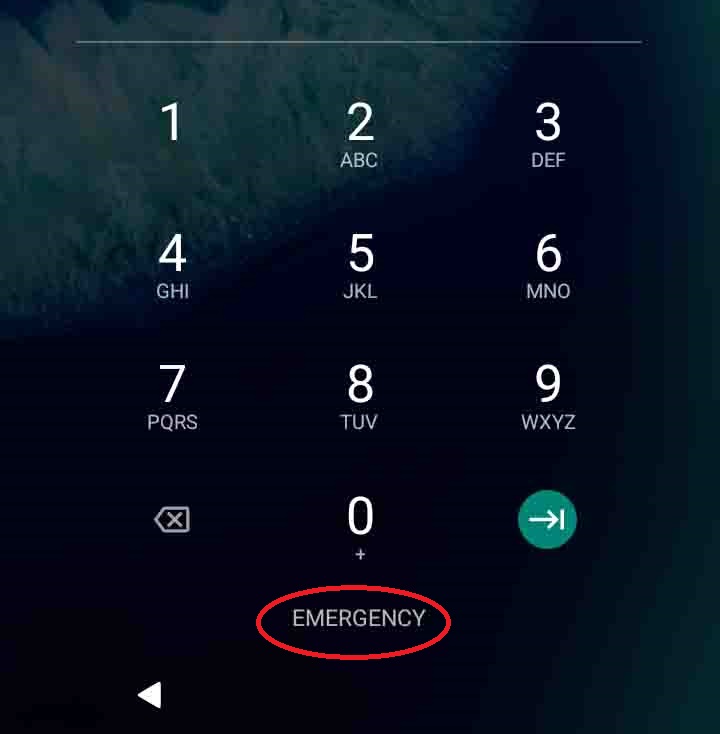 You don’t need to enter your pin number to make an emergency 999 or 112 emergency call. This means that if the only phone available is the injured persons and they are not responding you will still be able to use it. Open the phone and on the pin entry screen look for the emergency link or button. Press this and you will be able to dial 112 or 999. If you are not familiar with the phone you may need to tap the screen, swipe it or press the on/off button to show the pin entry screen.
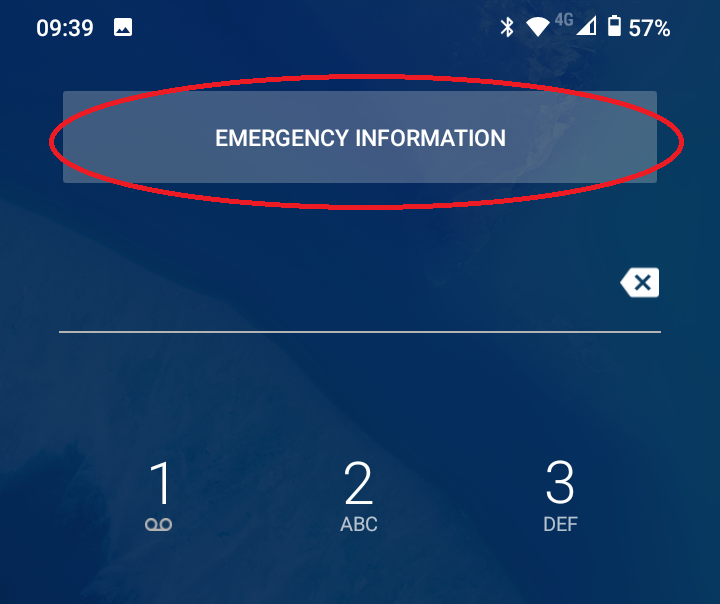
If you try this on your own phone you’ll notice that the emergency screen also has an Emergency Information button. If you click this it will show emergency information about you, which can include your name, an emergency contact and any significant medical details. This could be vital information for emergency services and we would encourage you to complete these details. The way to do that varies from phone to phone. It is often in settings, (search for emergency). Or you can access it by pressing the Emergency Information link, then press the edit button, enter your pin and insert your details.
 The other problem we face when contacting the emergency services is telling them where we are. At home or in an urban setting you’d give them your address or post code. As we well know post codes often don’t exist for the places we visit. Although we are familiar with OS map references they aren’t consistently used by the emergency services. There is however an App that they do recognise and that’s What 3 Words. What 3 Words breaks down the entire surface of the earth into 3 metre squares and assigns each square a unique 3 word code for example played.shepherdess.puncture is the code for the monument at Ashridge.
The examples shown are for an Android phone and your phone may look different. For iPhones instructions can be found here:
Make an emergency call from a locked iPhone
Set up Medical ID on an iPhone
 It’s a free app that you can download from the Apple App Store or Android Play Store. One problem you might experience is that some of the words can easily be confused for example band and banned. If this is happens and you’ve already registered with the 112 text service then you can send your location directly from What 3 Words as a text message:
Open What 3 Words
Select share,
Select messages,
Select (if it appears your contacts list) or type 112 as the recipient
Add your message – which service you require and the nature of the emergency
Press send.
One more web site that could be a life saver is Defib Finder. It will show you the nearest defibrillator to your current position. If one is needed time is critical and knowing where to find one can make all the difference. You’ll need to get an access code from the emergency services before you can release the device from its mounting. You don’t need training to use a defibrillator, they all give clear and simple audible instructions as soon as they opened.
We hope you don’t need to use any of this advice but it’s worth knowing – just in case.